Mono and Flux - Reactive Programming with Spring WebFlux
The Spring Framework is a widely used framework for building Java applications. It provides a comprehensive programming and configuration model for modern Java-based enterprise applications. One of the key features of the Spring Framework is its web framework, which allows developers to build web applications and RESTful web services.
The Web MVC is the original web framework provided in the Spring Framework. It was purpose-built for the Servlet API and Servlet containers. Later, the reactive-stack web framework, Spring WebFlux, was added in version 5.0. It is fully non-blocking, supports Reactive Streams backpressure, and runs on servers such as Netty, Undertow, and Servlet containers. The major change is that Spring Web MVC is a synchronous web framework, while Spring WebFlux is a reactive web framework.
Spring Web MVC
Spring Web MVC (Spring MVC) handles incoming HTTP requests to the appropriate handlers. Its name refers to the famous Model-View-Controller architectural design pattern which uses these three main components to build web applications:
- Model: Encapsulates the application data. Used to set the rules, logic, and data structures used by the application.
- View: Used to specify UI logic. Renders the model data and generates an HTML output for the user.
- Controller: Used to process (interpret and validate) user input. Passes data to the View component for rendering to the user.
Mono and Flux
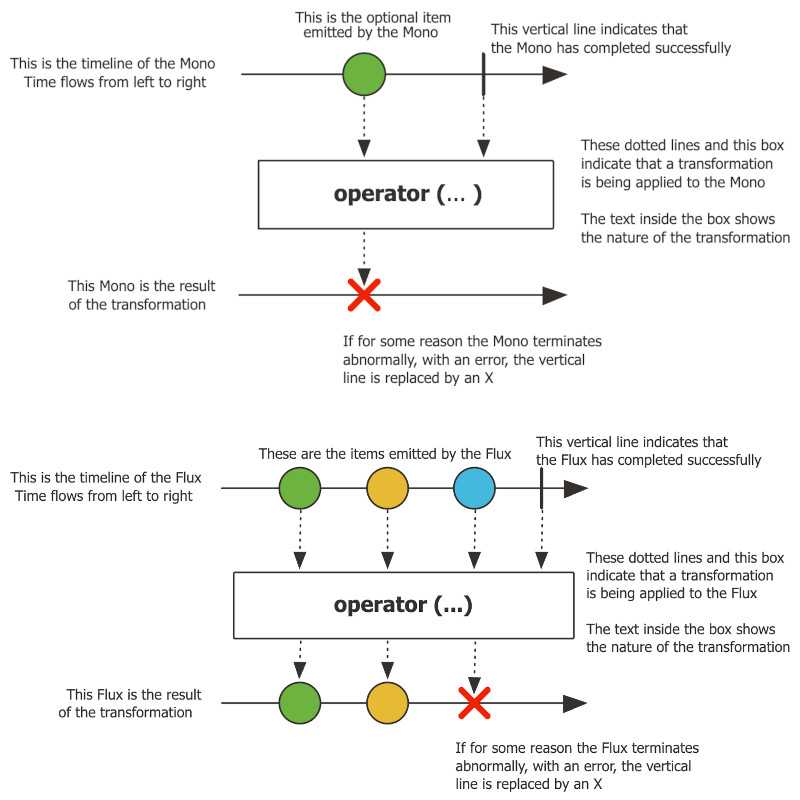
In Spring WebFlux, the two main types used for handling reactive data are Mono and Flux. Mono is a stream that emits at most one item, while Flux is a stream that emits zero or more items. Both Mono and Flux are implementations of the Reactive Streams Publisher interface. Here are a few code examples demonstrating the use of Mono and Flux in Spring WebFlux:
- Creating a Mono or Flux instance from static data:
Mono<String> mono = Mono.just("Hello, World!");
Flux<String> flux = Flux.just("Apple", "Banana", "Cherry");- Creating a Mono or Flux instance from a callable or supplier:
Mono<String> mono = Mono.fromCallable(() -> "Hello, World!");
Flux<String> flux = Flux.fromIterable(Arrays.asList("Apple", "Banana", "Cherry"));- Subscribing to a Mono or Flux instance to receive data:
mono.subscribe(System.out::println);
flux.subscribe(System.out::println);- Transforming data using operators:
Mono<String> upperCaseMono = mono.map(String::toUpperCase);
Flux<String> upperCaseFlux = flux.map(String::toUpperCase);- Combining multiple Mono or Flux instances:
Mono<String> combinedMono = Mono.zip(mono1, mono2, (data1, data2) -> data1 + " " + data2);
Flux<String> combinedFlux = Flux.zip(flux1, flux2, (data1, data2) -> data1 + " & " + data2);- Error handling:
Mono<String> errorMono = mono.onErrorReturn("Default Value");
Flux<String> errorFlux = flux.onErrorResume(e -> Flux.just("Default1", "Default2"));- Retry:
Mono<String> retryMono = mono.retryWhen(3, Duration.ofMillis(1000));
Flux<String> retryFlux = flux.retryWhen(3, Duration.ofMillis(1000));